Plugins (Embedding)
Plugins are custom interactive components built by other teachers (or you). Anything you can build with HTML/CSS/JS can be a plugin: a modular-arithmetic clock, a Dijkstra visualizer, a custom poll, a 3D molecule viewer, a Latin verb conjugator.
This chapter covers embedding existing plugins in your pages. For building a new plugin, see the developer guide chapter on Plugins.
Embedding a plugin
One line:
<plugin src="author-page-slug/plugin-slug" />
The src is <owner-slug>/<plugin-slug> — like a GitHub repo identifier.
<plugin src="marie/mod-clock" />
<plugin src="marcchehab/dijkstra" />
<plugin src="informatikgarten/excalidraw" />
The plugin renders inline as a sandboxed widget in your page. Students can interact with it; their state is saved per-student-per-page.
Passing config
Attributes on the <plugin> tag become config values inside the plugin:
<plugin
  src="informatikgarten/mod-clock"
  max="100"
  mod="7"
  font="14"
  lang="de"
/>
The plugin author defines what attributes their plugin understands. Hover over a plugin's listing in Dashboard → Plugins to see its supported config keys.
No allowlistThe host doesn't validate attribute names against a schema. You can pass any attribute; if the plugin doesn't use it, nothing happens. Plugin authors document their config keys (typically in the plugin's description or an info popup).
Passing content
Text between the tags is passed as content config:
<plugin src="marie/concept-graph">
node A -> node B -> node C
node B -> node D
</plugin>
The plugin gets "node A -> node B -> ..." as content and renders accordingly. Used by plugins that take a domain-specific input language (graph descriptions, math expressions, music notation, etc.).
Initial height
<plugin src="marie/mod-clock" height="500" />
Sets the iframe's initial height in pixels. After load, the plugin auto-resizes to fit its content (via the SDK's ResizeObserver), so this is mainly to avoid a layout-shift flash on first render.
How plugins work, in one diagram
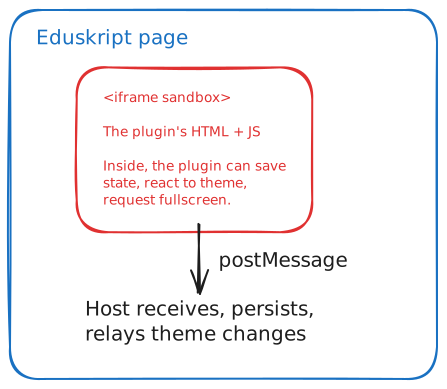 Plugins run in sandboxed iframes, communicating with the host via postMessage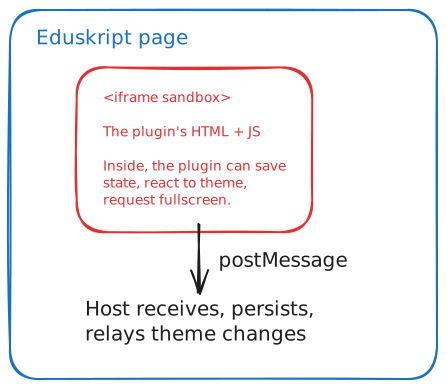
Plugins run in sandboxed iframes with strict Content-Security-Policy:
- No network access (can't
fetch()arbitrary URLs) - No access to your page's cookies, storage, or DOM
- Can only persist via the host (rate-limited, size-capped)
- Can only load scripts from approved CDNs
This means embedding a plugin is safe — even one written by someone you don't know can't exfiltrate student data, fingerprint browsers, or break out of its iframe.
Per-student state
When a student interacts with a plugin (clicks, enters text, makes a selection), the plugin can save state via the SDK. This state:
- Is per student (each student's state is private)
- Is per page (the same plugin embedded on two pages has two separate states)
- Is per plugin instance (two embeddings of the same plugin on the same page would share state — there's only one slot)
- Persists across sessions
Students don't need to do anything to save — it's automatic. They see their previous state when they return.
Browsing and discovering plugins
Dashboard → Plugins → Browse lists all published plugins on the platform. Filter by:
- Category (visualization, calculation, interaction, etc.)
- Author
- Most recently updated
- Most embedded
Click a plugin to see:
- A live preview
- Description and supported config keys
- Author and source HTML
- "Embed in skript" — copies the markdown to your clipboard
- "Fork" — creates a copy under your namespace, which you can modify
Forking a plugin
If someone else's plugin is almost what you want, fork it:
- Open the plugin in Dashboard → Plugins → Browse
- Click Fork
- Edit the entry HTML to your taste
- Save under your own slug
Embedding <plugin src="your-slug/forked-plugin" ></plugin> uses your forked version. The original is unchanged.
When to embed vs build a plugin
Embed when
- The exact thing you want already exists
- You can adapt it via attributes (no code changes needed)
- You want to follow what other teachers in your org are using
Build (or fork) when
- You need behavior that doesn't exist anywhere
- You're teaching a domain with specific visualizations (waveforms, chemistry molecules, language conjugation drills)
- You want a plugin tied to your teaching style (colors, layout, language)
For physics, chemistry, maths and biology, check PhET first: around 120 free simulations embed with one line, almost all in German.
Building is covered in the developer guide. The short version: write a single HTML file with embedded JS, paste it into the Plugins → New form, give it a slug, publish.
Embedding cheat sheet
| Goal | Syntax |
|---|---|
| Embed a plugin | <plugin src="owner-slug/plugin-slug" ></plugin> |
| Pass config | <plugin src="..." myparam="value" ></plugin> (any attribute name) |
| Pass content (DSL input) | <plugin src="...">my content here</plugin> |
| Set initial height | <plugin src="..." height="500" ></plugin> |
| Browse plugins | Dashboard → Plugins → Browse |
| Fork to customize | Plugin's page → Fork button |